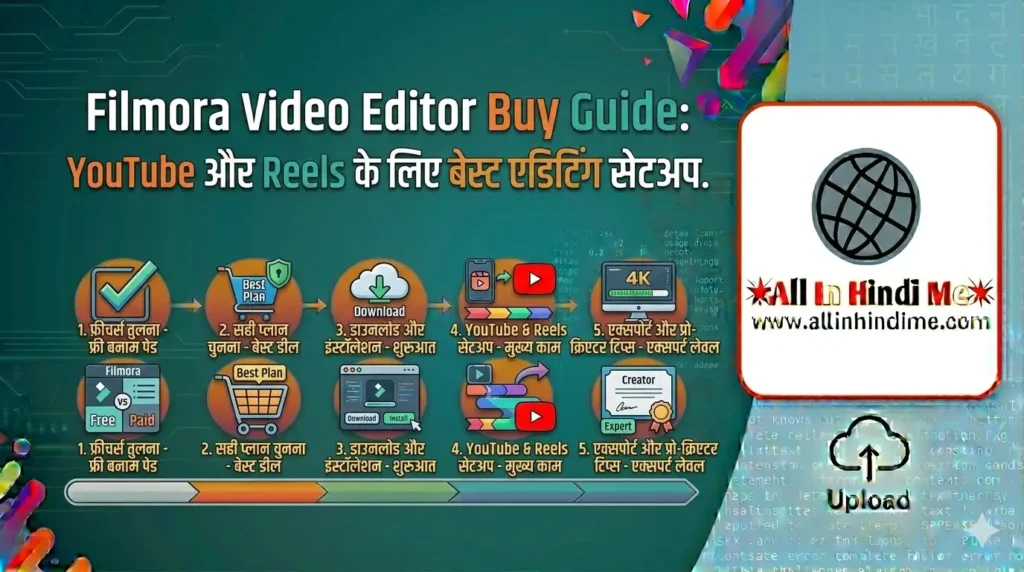
Wondershare Filmora 16 का Complete Buying Guide पढ़ें। जानें AI Features, Camera Tracking, कीमत, System Requirements, फायदे-नुकसान और उपयोगी Accessories।
आज के समय में Video Editing केवल Professional Video Editors तक सीमित नहीं है। YouTube Videos, Facebook Reels, Instagram Reels, Travel Vlogs, Tutorials, Wedding Videos और Online Content बनाने के लिए भी अच्छे Video Editing Software की जरूरत पड़ती है।
अगर आप ऐसा Video Editing Software चाहते हैं जिसका Interface समझना आसान हो और जिसमें AI Tools, Effects, Transitions, Text Animation तथा Audio Editing जैसी सुविधाएं मिलें, तो Wondershare Filmora आपके लिए एक विकल्प हो सकता है।
Filmora को Beginners, YouTubers, Social Media Creators और सामान्य Video Editors को ध्यान में रखकर बनाया गया है। इसका उपयोग Windows और Mac Computers के अलावा Mobile Devices पर भी किया जा सकता है।
आप Amazon India पर Filmora से संबंधित उपलब्ध Software और Offers यहां देख सकते हैं:
इस Filmora Video Editor Buying Guide 2027 में हम इसके Latest Version, AI Features, Editing Tools, Price, License Plans, System Requirements, फायदे, नुकसान और Alternatives के बारे में विस्तार से जानेंगे।
Table of Contents
क्या Wondershare Filmora खरीदना चाहिए?
अगर आप Beginner हैं और YouTube Videos, Reels, Tutorials, Vlogs या सामान्य Social Media Content बनाते हैं, तो Filmora एक उपयोगी Video Editing Software हो सकता है।
इसमें Timeline Editing, AI Tools, Dynamic Captions, Screen Recording, Transitions, Effects, Color Correction और Audio Editing जैसी सुविधाएं मिलती हैं।
इसके Latest V16 में Camera Tracking, Color Mask, AI Media Analysis और Multi-Source Recording जैसे Features भी शामिल किए गए हैं।
लेकिन यदि आप बहुत Advanced Professional Video Production, Complex Compositing या High-End Color Grading करना चाहते हैं, तो DaVinci Resolve और Adobe Premiere Pro जैसे विकल्पों पर भी विचार करें।
हमारी सलाह: खरीदने से पहले Filmora का Free Version या Trial इस्तेमाल करें और Export पर लागू Watermark तथा Paid Features की शर्तें समझ लें।
Wondershare Filmora क्या है?
Wondershare Filmora एक Video Editing Software है, जिसे Wondershare Technology ने विकसित किया है।
इसकी मदद से आप:
Video Clips को Cut और Trim कर सकते हैं।
कई Videos को एक Timeline में जोड़ सकते हैं।
Background Music और Sound Effects लगा सकते हैं।
Text और Animated Titles बना सकते हैं।
Transitions और Visual Effects इस्तेमाल कर सकते हैं।
Video का Color और Lighting सुधार सकते हैं।
Subtitles और Captions जोड़ सकते हैं।
Screen Recording कर सकते हैं।
Social Media के लिए Vertical Videos बना सकते हैं।
4K और अन्य Supported Formats में Video Export कर सकते हैं।
Filmora का मुख्य उद्देश्य Video Editing को Beginners और सामान्य Content Creators के लिए आसान बनाना है।
Filmora 16 में क्या नया है?
नवंबर 2026 में Wondershare की आधिकारिक Release Notes के अनुसार Filmora का नवीनतम प्रमुख Version V16 है।
इस Version में कई नए Editing और AI Features शामिल किए गए हैं।
1. Camera Tracking
Camera Tracking की मदद से आप Video में किसी Subject को Track कर सकते हैं और उसकी Movement के अनुसार Camera Framing को बनाए रखने में सहायता पा सकते हैं।
उदाहरण के लिए, यदि कोई व्यक्ति स्क्रीन पर एक तरफ से दूसरी तरफ जाता है, तो Tracking Feature उसकी Position के अनुसार Visual Framing में मदद कर सकता है।
2. Color Mask
Color Mask Feature की मदद से आप Video के किसी विशेष हिस्से पर Color Adjustments लागू कर सकते हैं।
उदाहरण के लिए, किसी Video में केवल आसमान, कपड़ों या किसी अन्य Selected Area के Color को बदलना चाहते हैं, तो यह Feature उपयोगी हो सकता है।
3. 360° Video Reframing
यदि आपके पास 360° Camera से रिकॉर्ड किया गया Footage है, तो 360° Video Reframing की मदद से उसे सामान्य Video Shots में बदलने का Workflow मिलता है।
यह Travel और Creative Video Projects में उपयोगी हो सकता है।
4. AI Media Analysis
AI Media Analysis आपके Video Clips को Content के आधार पर Label और Score करने में मदद करता है।
इससे बड़े Video Projects में सही Clips खोजने का काम आसान हो सकता है।
5. Smart Text Correction
Video Captions और Text में गलतियां हो सकती हैं। Smart Text Correction की मदद से Text Errors की जांच और सुधार करने का विकल्प मिलता है।
6. Multi-Source Recording
इस Feature की मदद से Screen, Camera और Audio Sources को एक ही Recording Session में Capture किया जा सकता है।
यह YouTube Tutorials, Online Classes और Software Demonstrations बनाने वालों के लिए उपयोगी हो सकता है।
7. Dynamic Captions
Dynamic Captions की मदद से Speech से Subtitles तैयार करके उन्हें अलग-अलग Styles में प्रस्तुत किया जा सकता है।
इससे Reels, Shorts और YouTube Videos में Captions जोड़ना आसान हो सकता है।
8. AI Night View
कम रोशनी में रिकॉर्ड किए गए Video में Noise और Details की समस्या हो सकती है। AI Night View ऐसे Footage को बेहतर बनाने के लिए उपलब्ध AI Features में शामिल है।
Combo Animation की मदद से आप किसी Visual Element के Entry, Main Animation और Exit Effects को अधिक आसानी से तैयार कर सकते हैं।
10. Shortcut Key Manager
नए Shortcut Key Manager से आप अपने Editing Shortcuts को अपनी जरूरत के अनुसार Customize और Manage कर सकते हैं।
इससे बार-बार इस्तेमाल होने वाले Editing Commands तक जल्दी पहुंचना आसान हो सकता है।
Wondershare Filmora के मुख्य Features
Feature
उपयोग
Timeline Editing
Video Clips को व्यवस्थित करना
Camera Tracking
Moving Subject को Track करना
Color Mask
Selected Area का Color बदलना
AI Media Analysis
Video Clips को Analyze करना
Smart Text Correction
Captions में Errors सुधारना
Multi-Source Recording
Screen, Camera और Audio साथ रिकॉर्ड करना
Dynamic Captions
Automatic और Styled Subtitles
AI Night View
Low-Light Video सुधारना
Combo Animation
Animated Elements तैयार करना
Screen Recorder
Computer Screen रिकॉर्ड करना
Motion Tracking
Objects की Movement Track करना
Keyframe Animation
Custom Animation बनाना
Color Correction
Video का Color सुधारना
Audio Editing
Voice और Background Music सुधारना
Green Screen
Chroma Key Editing
4K Export
Supported 4K Video Export
Filmora में AI Features
Filmora की एक खास बात इसमें लगातार जोड़े जा रहे AI Tools हैं।
इनकी मदद से कई सामान्य Editing Tasks को आसान बनाया जा सकता है।
AI Video Editing
AI आधारित Features का उपयोग Video Clips, Captions, Visual Effects और Creative Content तैयार करने में किया जा सकता है।
AI Video Enhancer
कुछ AI Tools कम गुणवत्ता वाले Footage को बेहतर बनाने और Video Details सुधारने में सहायता कर सकते हैं।
AI Captions
Speech Recognition की मदद से Video में बोले गए शब्दों को Text या Subtitles में बदलने का विकल्प मिलता है।
AI Audio Tools
Voice और Background Audio को बेहतर बनाने के लिए अलग-अलग Audio Processing Features उपलब्ध हैं।
AI Media Analysis
यह बड़े Projects में सही Video Clips खोजने और व्यवस्थित करने में मदद कर सकता है।
ध्यान दें: कुछ AI Features के लिए AI Credits, Internet Connection या Paid Plan की जरूरत हो सकती है। हर Feature की उपलब्धता आपके Version और Plan पर निर्भर करती है।
Filmora की कीमत भारत में कितनी है?
Filmora की कीमत उसके License Plan, Operating System, Subscription अवधि और उपलब्ध Offers के अनुसार बदल सकती है।
आमतौर पर Wondershare अलग-अलग प्रकार के Plans प्रस्तुत करता है, जैसे:
Monthly Subscription
Annual Subscription
Cross-Platform Plans
Perpetual या Lifetime License (जहां उपलब्ध हो)
Advanced और Premium Plans
कौन-सा Plan आपके लिए सही है, यह आपके इस्तेमाल पर निर्भर करता है।
Filmora खरीदने से पहले क्या जांचें?
License कितने समय के लिए है?
क्या License Windows और Mac दोनों पर काम करता है?
क्या AI Credits शामिल हैं?
क्या Creative Assets की सुविधा मिलती है?
क्या Free Updates शामिल हैं?
क्या Perpetual License में Future Major Versions के Updates मिलेंगे?
क्या एक या अधिक Devices पर इस्तेमाल की अनुमति है?
Amazon India पर Filmora के उपलब्ध Software और Offers यहां देखें:
महत्वपूर्ण: Amazon पर किसी Third-Party Seller से Software खरीदते समय Activation Method, Region Compatibility, License Validity और Seller की विश्वसनीयता जरूर जांचें। केवल कम कीमत देखकर अनजान Activation Keys न खरीदें।
Filmora का Free Version Software सीखने और कुछ Editing Tasks आजमाने के लिए उपयोगी हो सकता है। लेकिन Free और Paid Version के बीच कुछ महत्वपूर्ण अंतर होते हैं।
Feature
Free Version
Paid Version
Basic Editing
उपलब्ध
उपलब्ध
Timeline Editing
उपलब्ध
उपलब्ध
Effects
सीमित या Plan के अनुसार
अधिक विकल्प
Premium Assets
सीमित
Plan के अनुसार
AI Credits
सीमित या अलग शर्तें
Plan के अनुसार
Export
Watermark लागू हो सकता है
Paid License के अनुसार
Updates
Version के अनुसार
License के अनुसार
Customer Support
सीमित
Plan के अनुसार
महत्वपूर्ण: Free Version से Export करने पर Watermark लग सकता है। इसलिए किसी भी महत्वपूर्ण Video को Final Export करने से पहले Trial की शर्तें जांच लें।
Filmora System Requirements
Software खरीदने या Install करने से पहले अपने Computer की Specifications जांचना जरूरी है।
Windows System Requirements
Requirement
Minimum
Recommended
Operating System
Windows 7/8.1/10/11 (64-bit)
Windows 10 या 11
Processor
Intel 6th Gen या Equivalent
Intel 9th Gen या नया
RAM
8GB
16GB
Graphics
Supported GPU और 2GB VRAM
4GB VRAM
Storage
10GB Free Space
SSD Recommended
Display
1280 × 800
1920 × 1080 या अधिक
8K Video Editing Requirements
अगर आप 8K Video Editing करना चाहते हैं, तो अधिक Powerful Computer की जरूरत होगी।
Intel Core i9 10th Gen या नया अथवा AMD Ryzen 9 3000 Series या नया।
ध्यान दें: Filmora के अलग-अलग Versions में System Requirements बदल सकती हैं। Install करने से पहले आधिकारिक Tech Specs Page पर अपने Version की Requirements जांचें।
Filmora के साथ कुछ Accessories आपके Video Editing Workflow को बेहतर बना सकती हैं। ये Software की अनिवार्य जरूरत नहीं हैं, लेकिन YouTubers और Content Creators के लिए उपयोगी हो सकती हैं।
1. External SSD – Video Files और Projects के लिए
Video Editing में Raw Footage और Project Files का आकार काफी बड़ा हो सकता है। इसलिए External SSD का इस्तेमाल Backup और File Storage के लिए किया जा सकता है।
Wondershare Filmora एक Video Editing Software है, जिसमें Timeline Editing, AI Tools, Effects, Transitions, Audio Editing और Screen Recording जैसी सुविधाएं मिलती हैं।
Wondershare Filmora एक उपयोगी Video Editing Software है, खासकर उन लोगों के लिए जो YouTube Videos, Reels, Tutorials, Vlogs और Social Media Content बनाते हैं।
इसके Camera Tracking, Color Mask, AI Media Analysis, Dynamic Captions और Multi-Source Recording जैसे Features Video Editing Workflow को बेहतर बनाने में मदद कर सकते हैं।
लेकिन खरीदने से पहले License Type, AI Credits, Premium Assets और System Requirements जरूर समझें।
अगर आप इसे खरीदना चाहते हैं, तो Amazon India पर उपलब्ध Software और Offers यहां देख सकते हैं:
हमारी अंतिम सलाह: यदि आप Beginner हैं या Social Media के लिए Video Editing करते हैं, तो पहले Filmora का Free Version आजमाएं। यदि आपको इसका Workflow पसंद आता है और इसकी सुविधाएं आपकी जरूरत पूरी करती हैं, तभी Paid License खरीदें।
Affiliate Disclosure: इस लेख में Amazon Affiliate Links शामिल हैं। यदि आप इन Links के माध्यम से कोई Product खरीदते हैं, तो AllInHindiMe.com को बिना किसी अतिरिक्त लागत के कमीशन मिल सकता है। इससे हमारी वेबसाइट को सहयोग मिलता है। हम पाठकों को उपयोगी और प्रासंगिक Products की जानकारी देने का प्रयास करते हैं।
-:नोट:-
ऐसे ही सभी जानकारी हम सबसे पहले अपने इस वेबसाइट https://allinhindime.com के माध्यम से देते हैं तो आप हमारे वेबसाइट को फॉलो करना ना भूलें ।
अगर यह आर्टिकल पसंद आया है तो इसे Like और share जरूर करें ।